📚 Source of Truth
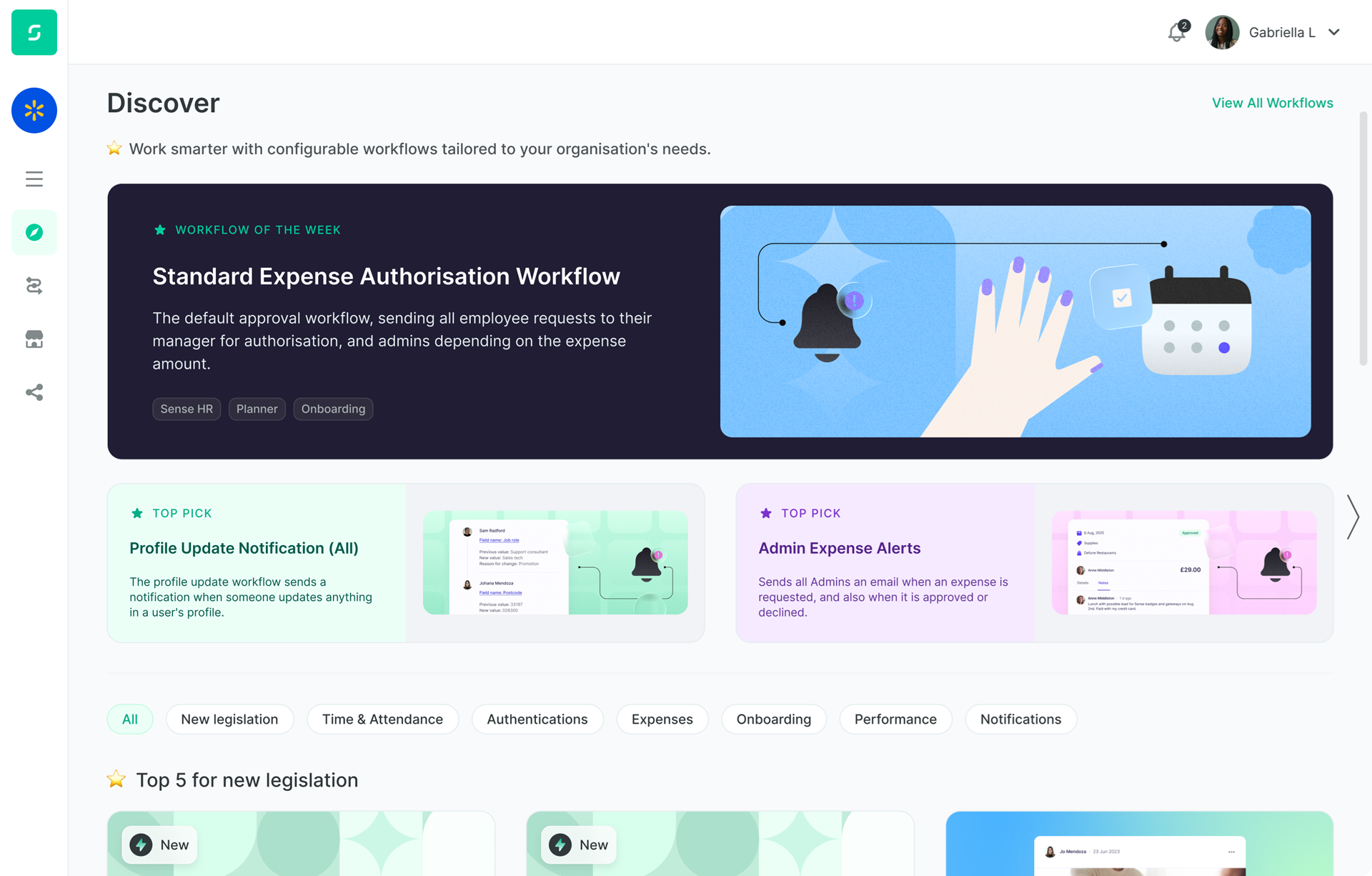
All PASS / FAIL verdicts below are graded against the revised story (ENG-5332_rev.xml, updated 2026-06-05) — not the Figma design (ENG-5332_rev.png). Where the design and story conflict, the story wins. A dedicated Design vs Story Conflicts section below documents the divergences for context.
Counting convention: "Tile" = one distinct labeled workflow (a TOP PICK card with its title, description and image grouped together as one DOM node, not the visual sub-cards). This matches the story's apparent intent when it says "three tiles at a time".
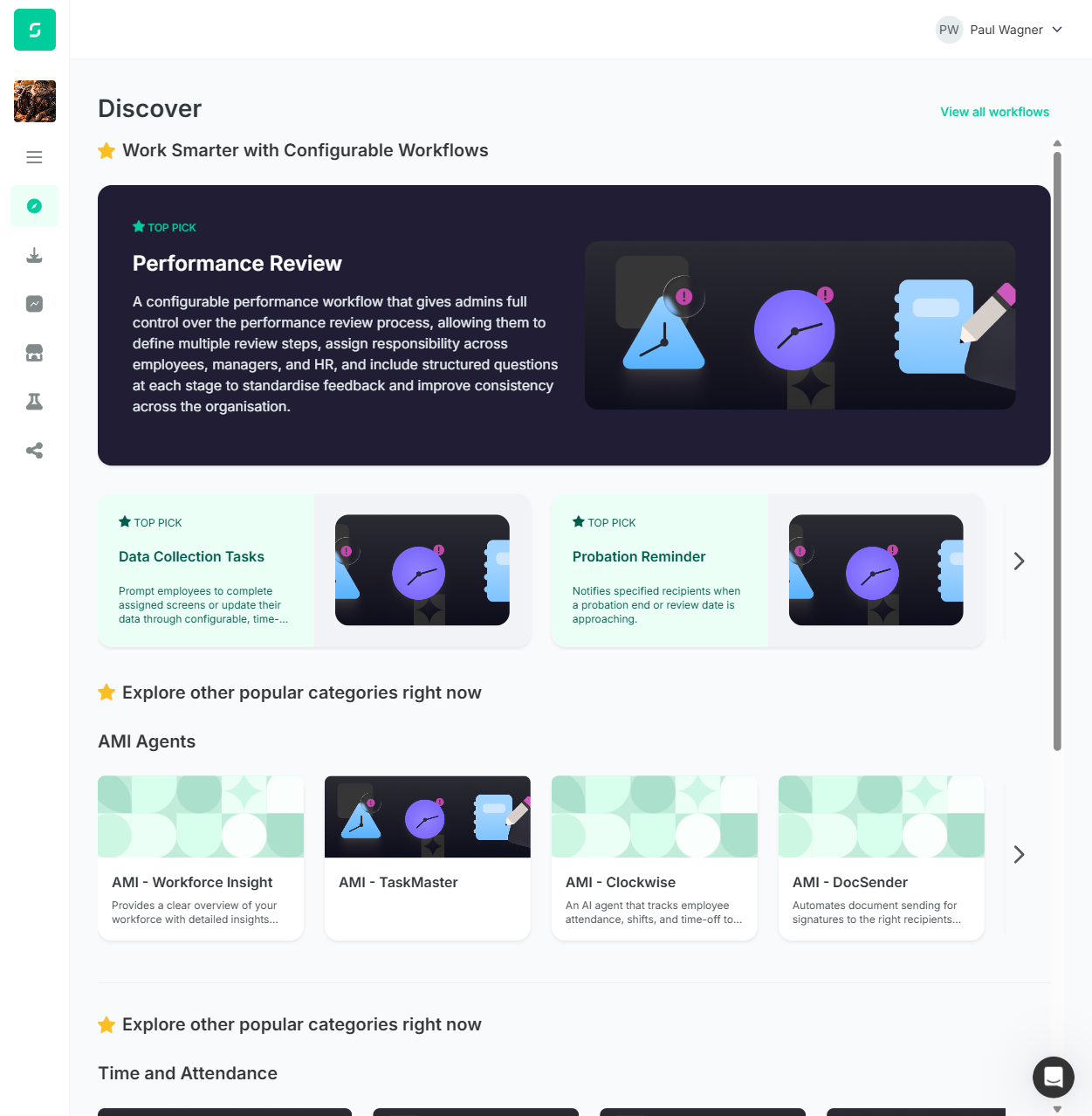
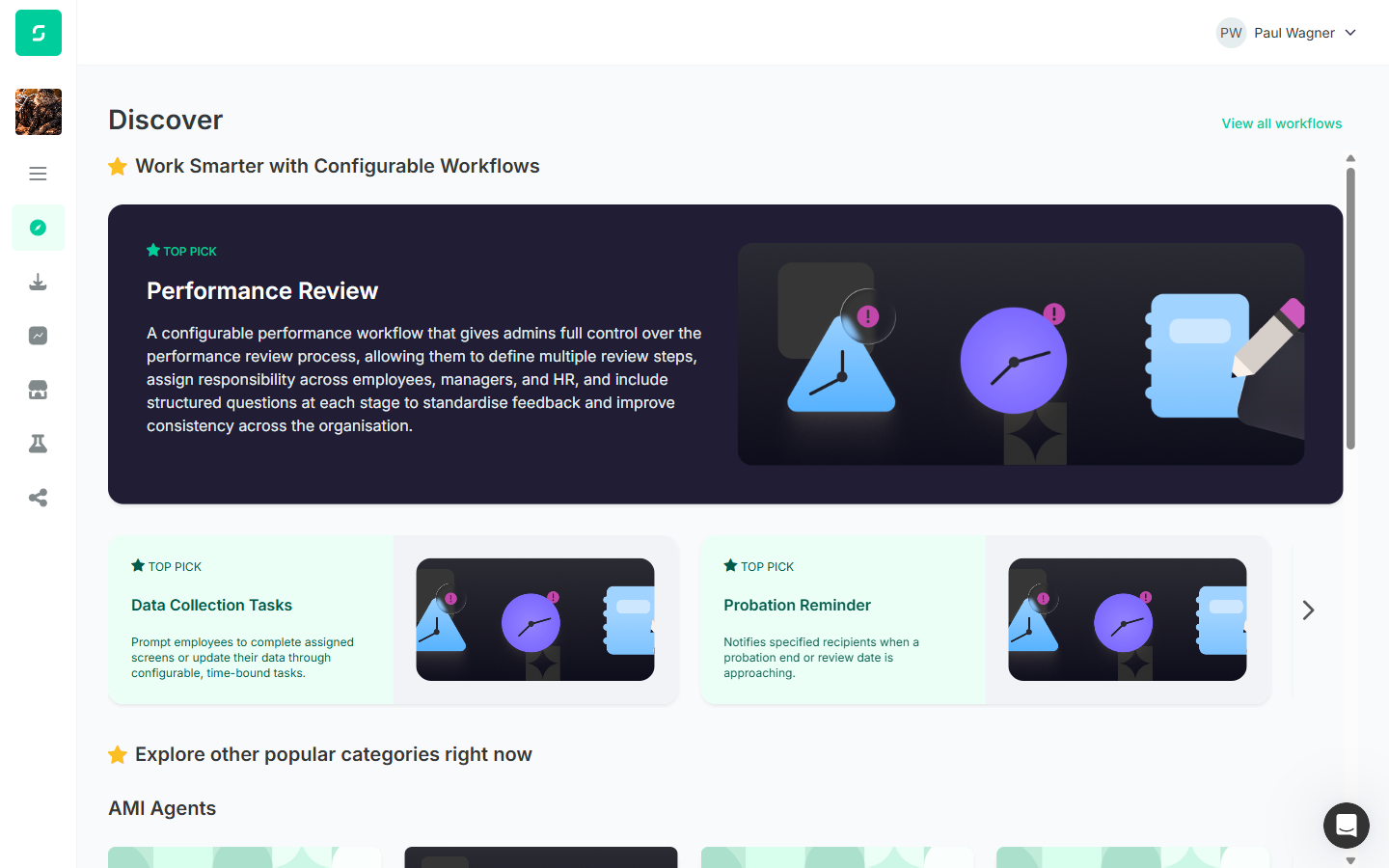
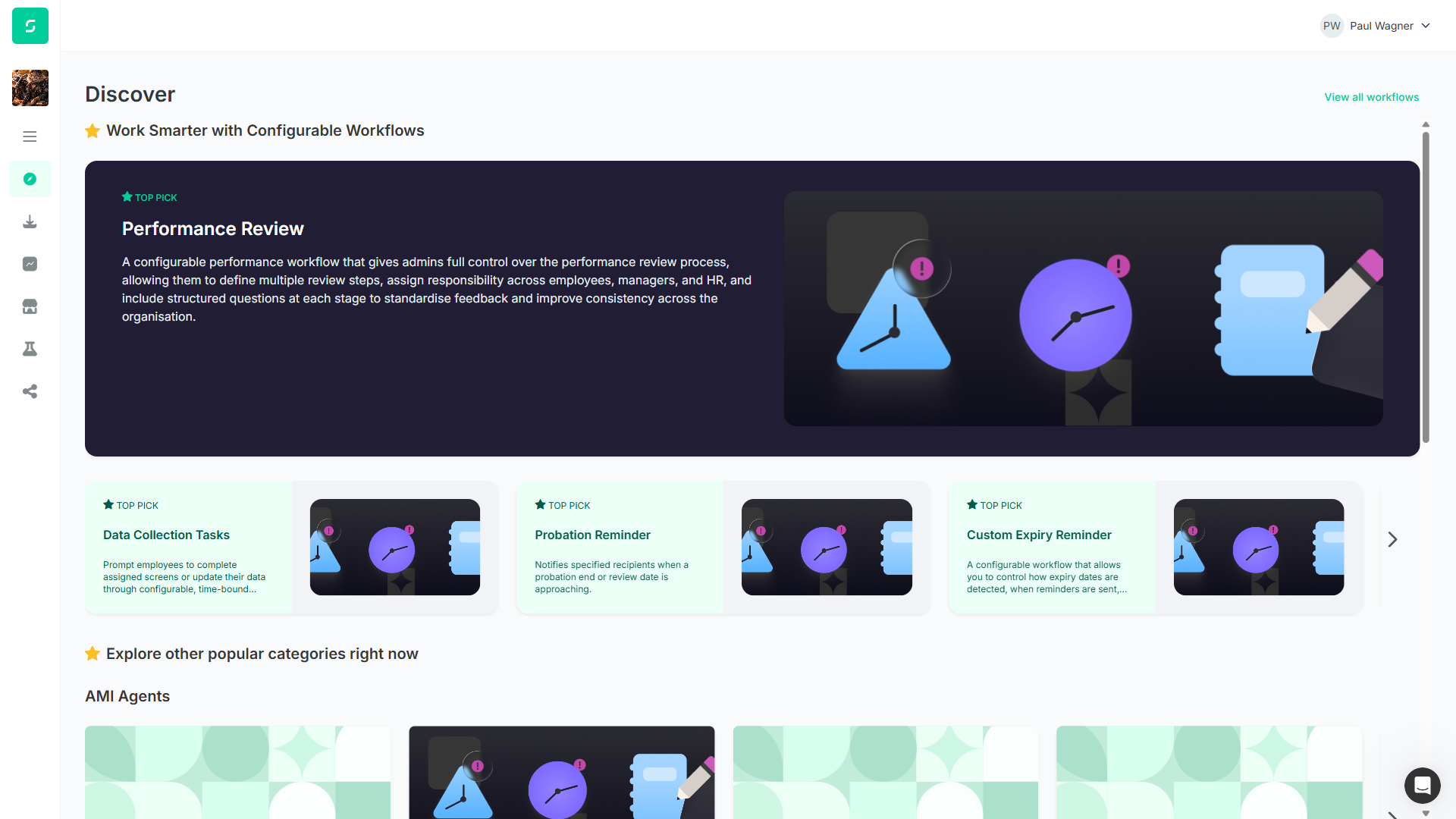
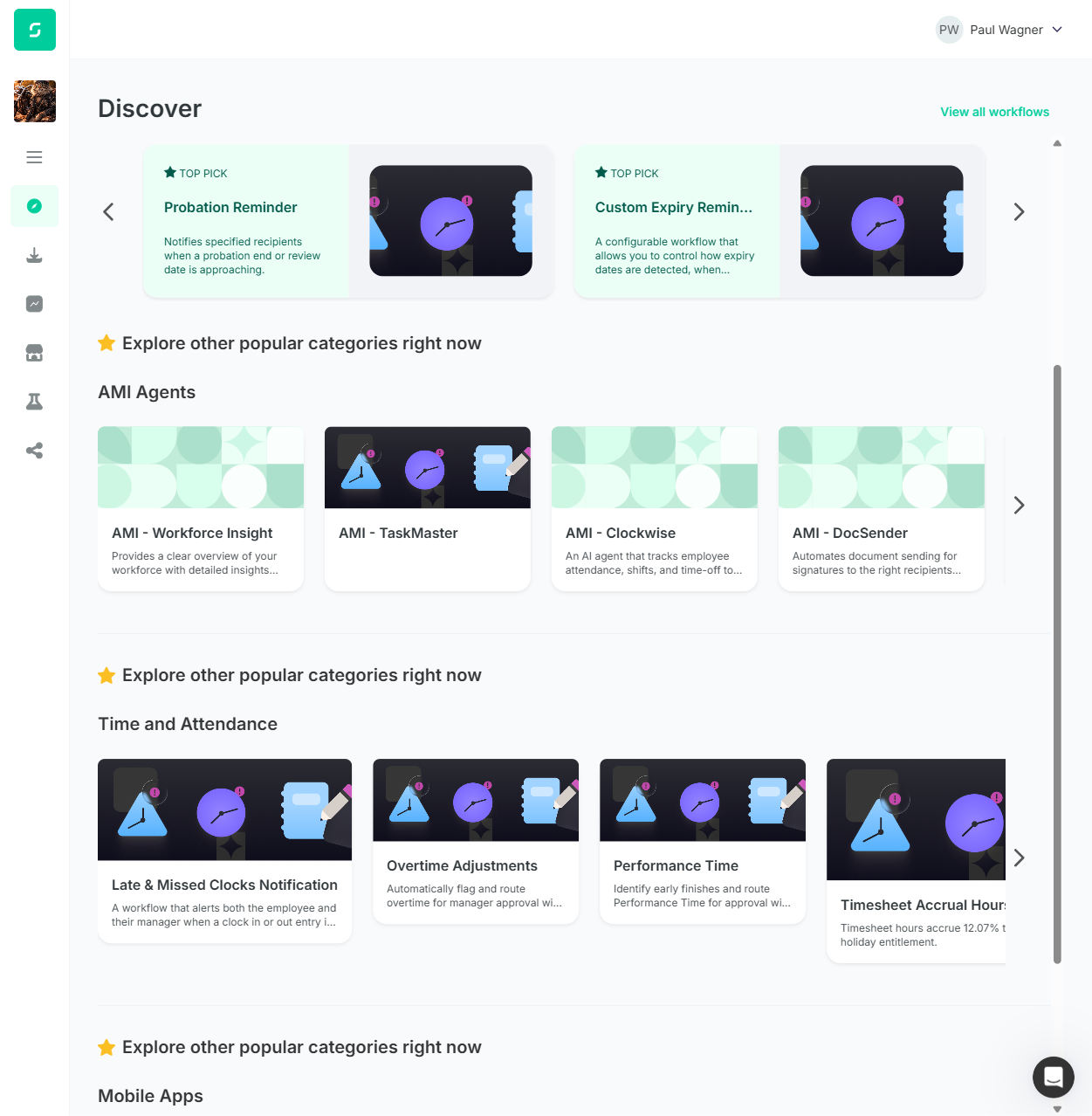
Responsive coverage: Initial run was at 1251px viewport (laptop). After tester feedback, retested at 6 viewports (1280, 1440, 1680, 1920, 2560, 3840, 5120) to characterise responsive behaviour. See Responsive Behaviour section — this surfaced a new FAIL (F5) that the single-viewport run missed and made F2 (Spotlight tile count) viewport-dependent.
Overall Summary
Test cases generated against the revised story (ENG-5332_rev.xml) and executed end-to-end against the live automate.dev.sense.engineering/discover page after Cristian's implementation. Each step was verified via Playwright snapshot, JS evaluation for positional/colour checks, and visual screenshot comparison.
| Test Case | Steps | Pass | Fail | Result |
|---|---|---|---|---|
| TC1 — Verify Discover Page Spotlight Section | 13 | 9 | 4 | PARTIAL |
| TC2 — Verify Discover Page Category Sections | 9 | 8 | 1 | PARTIAL |
| TC3 — Verify Tile Behaviour and Page Navigation | 10 | 10 | 0 | PASS |
| TC4 — Verify This Month's Configured Content | 11 | 10 | 1 | PARTIAL |
| Total (after responsive sweep) | 43 | 38 | 5 | 88% pass |
Failures Summary (with story-line citations)
Each row quotes the exact line from ENG-5332_rev.xml that the implementation failed to meet.
| # | TC | Story line (quote) | Actual on /discover | Severity |
|---|---|---|---|---|
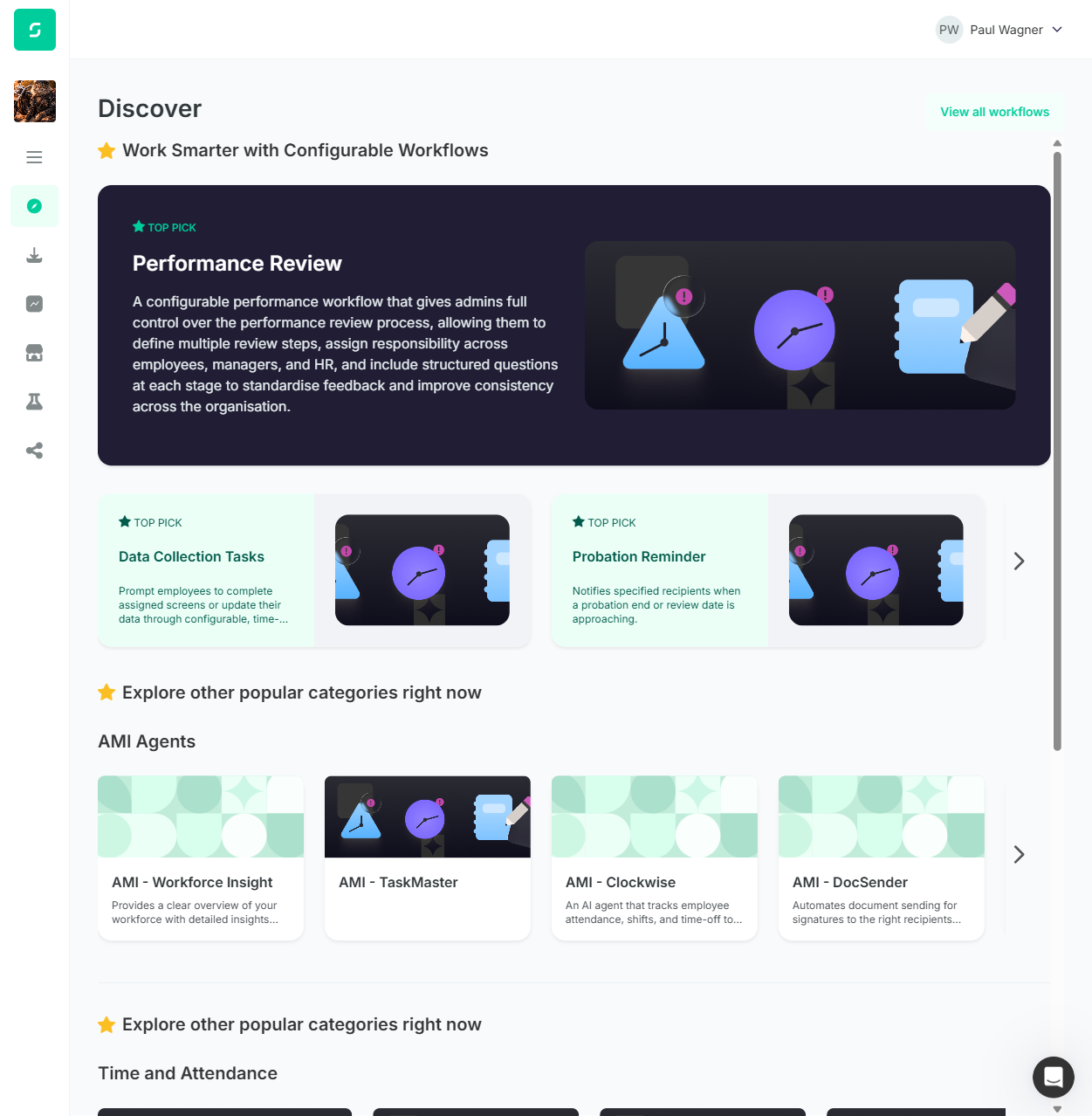
| F1 | TC1.9 | "Primary workflow will also display it’s categories as chips" — Spotlight section bullet (green-added in revision) | No chip elements present on Performance Review tile; DOM contains only TOP PICK badge, h3 title, description paragraph, image. Zero chip children. Confirmed at all 6 tested viewports. | High |
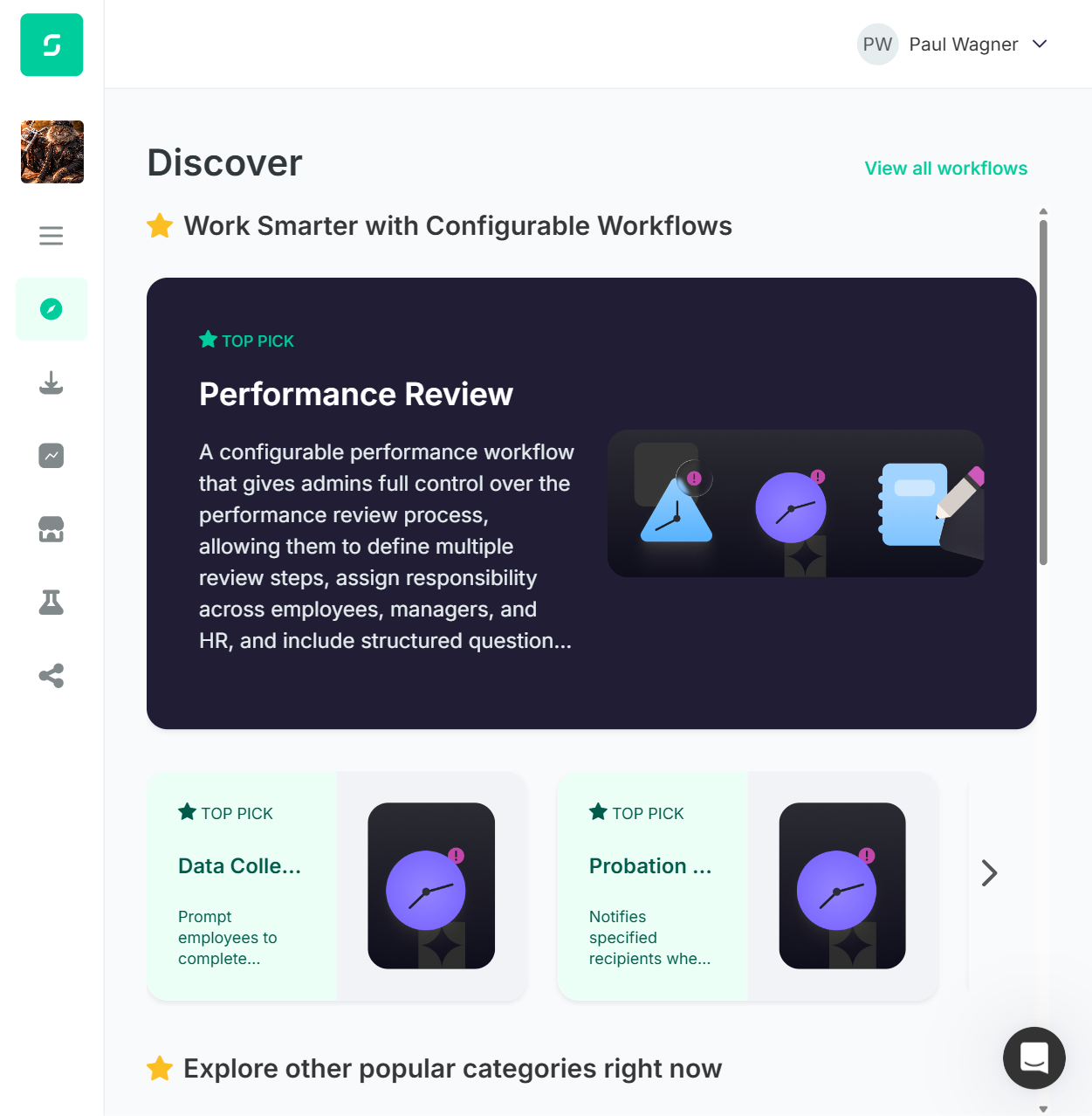
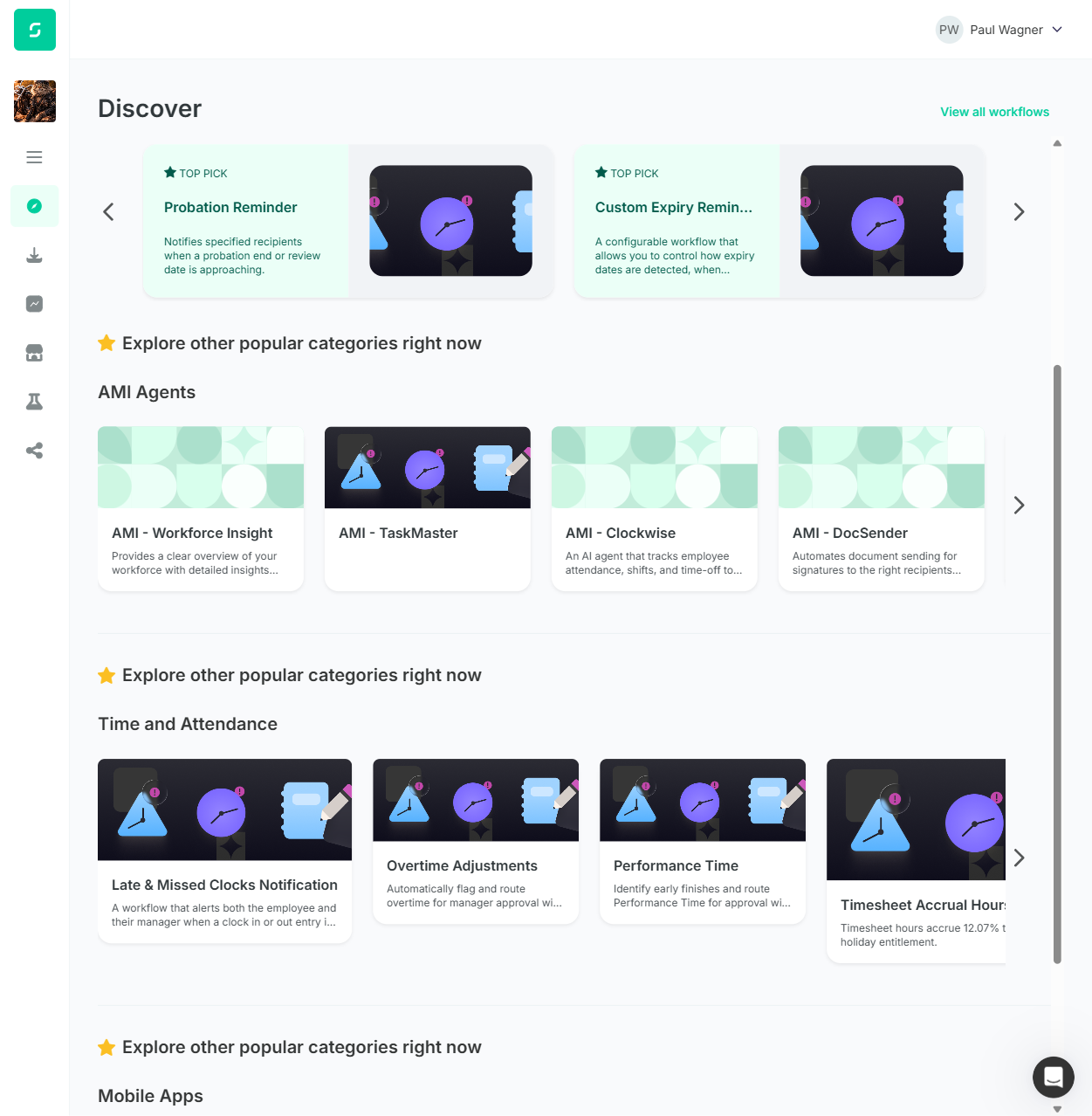
| F2 (revised) | TC1.11 | "Shows | Viewport-dependent: 1280px → 2 tiles, 1440px → 2 tiles, 1680px+ → 3 tiles. The story does not specify a minimum viewport, but at common laptop sizes (1280, 1366, 1440) the requirement is not met. At 1680+, 3 tiles are visible as required. | Medium |
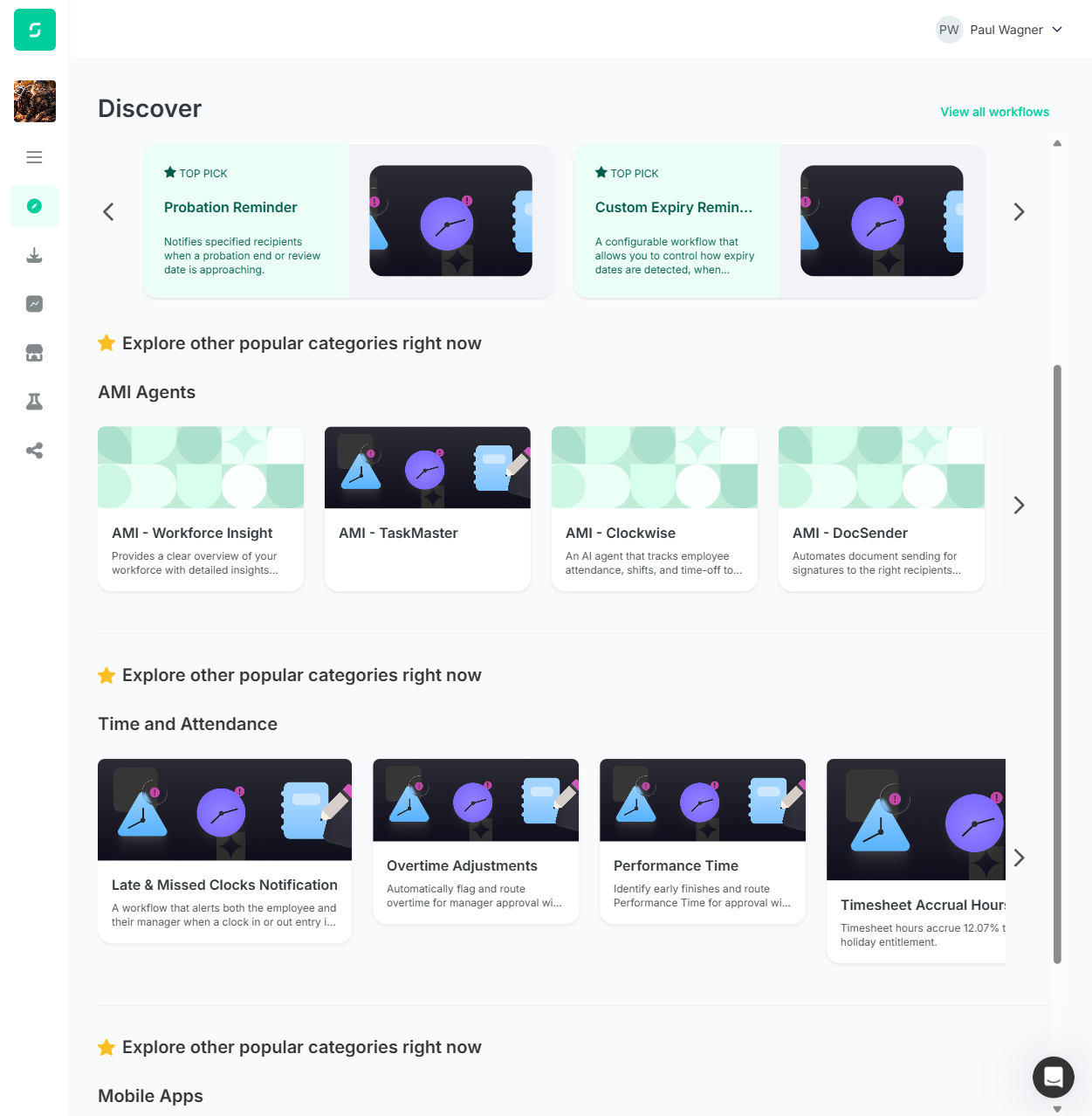
| F3 | TC2.6 | "Three workflow tiles visible by default" — Each category section bullet | 4 distinct labeled workflows visible per category row at every tested viewport (1280, 1440, 1680, 1920, 2560, 3840, 5120). Story says 3, implementation says 4 universally. | Medium |
| F4 | TC4.4 | Spotlight description: "A configurable performance workflow that allows admins to design review steps with structured questions for employees, managers, and HR, ensuring a consistent and repeatable review cycle." | Different text deployed: "A configurable performance workflow that gives admins full control over the performance review process, allowing them to define multiple review steps…" (Note: story author commented "i might change it a bit if it needs more or less text" — so deviation may be intentional.) | Low |
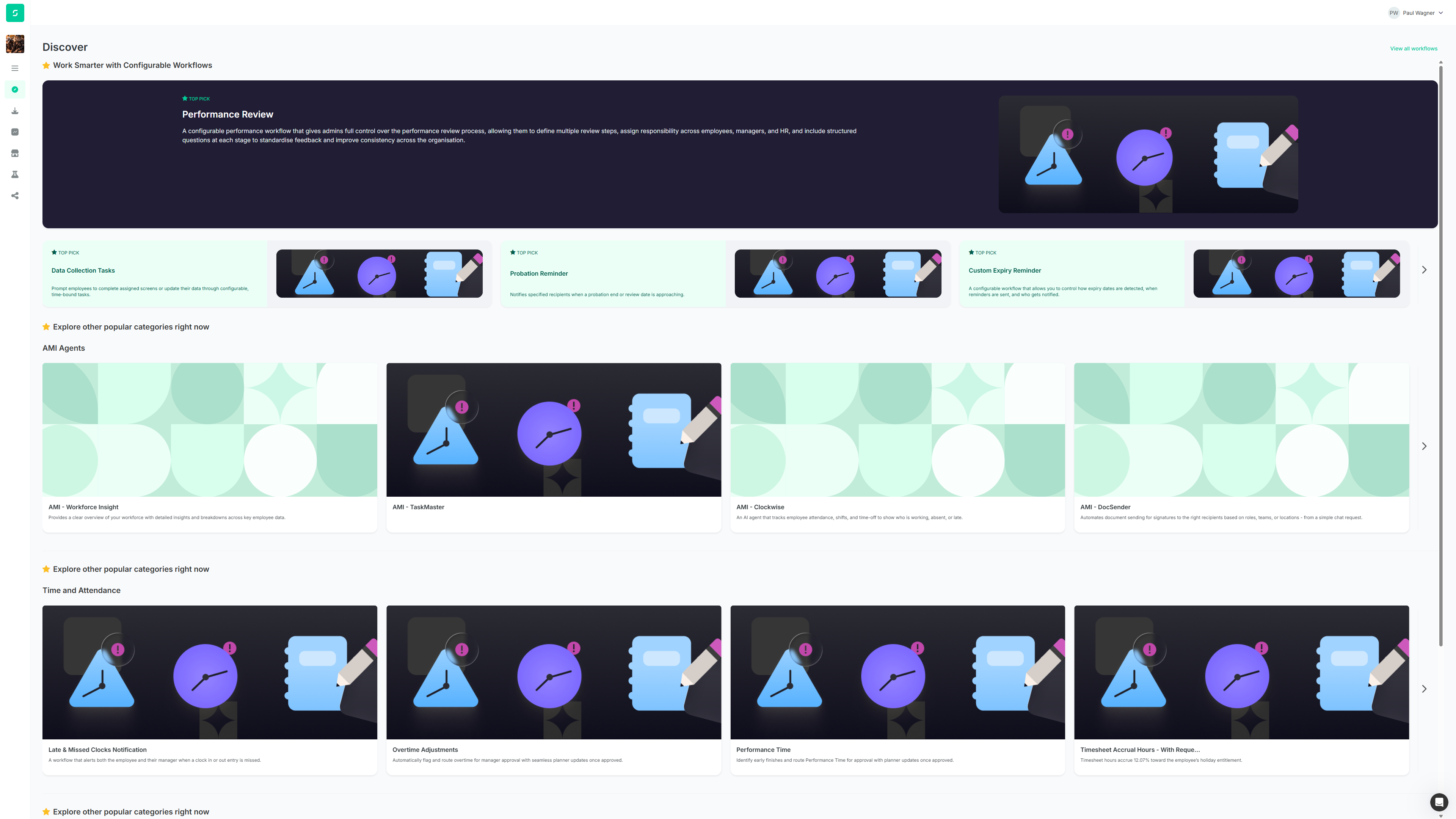
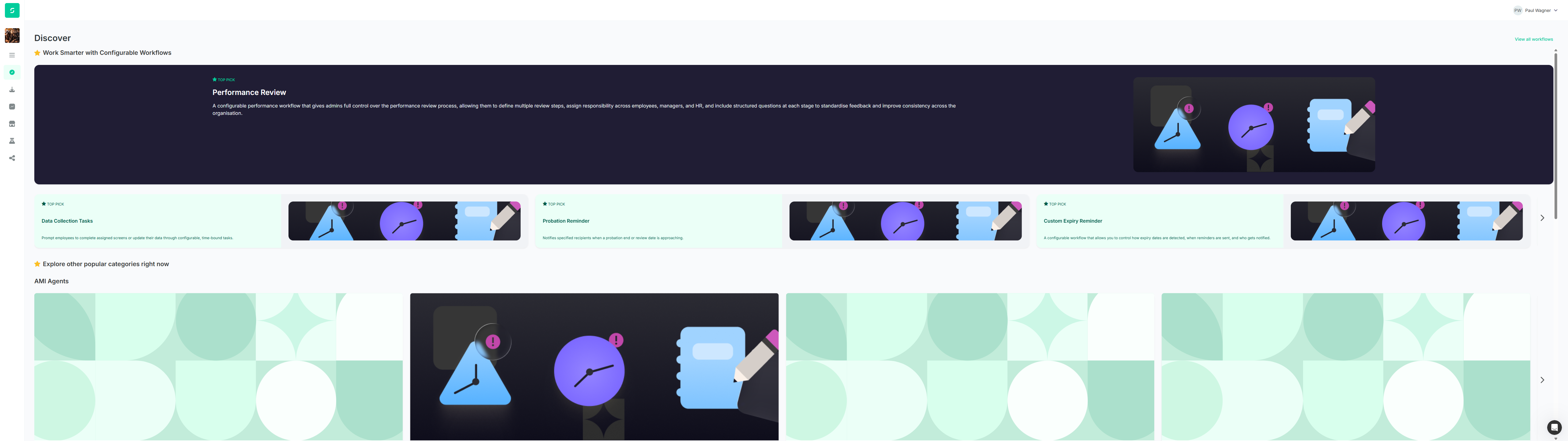
| F5 (new) | TC1.7 / TC1.8 | "Primary workflow will have black banner around it that spans to the width of the screen, using the black space as margins to keep image and text from being stretched when zooming" | Black banner spans full width but the content inside stretches with the viewport — no max-width constraint. Text column grows from 840px (at 1920) → 1800px (at 3840) → 2440px (at 5120). Image stays fixed at 790px so it looks proportionally tiny on large screens. The "black space as margins" requirement is unmet at all viewports above ~1100px. Missed in initial single-viewport run; caught by responsive sweep. | High |
Failure visuals
Responsive Behaviour Sweep
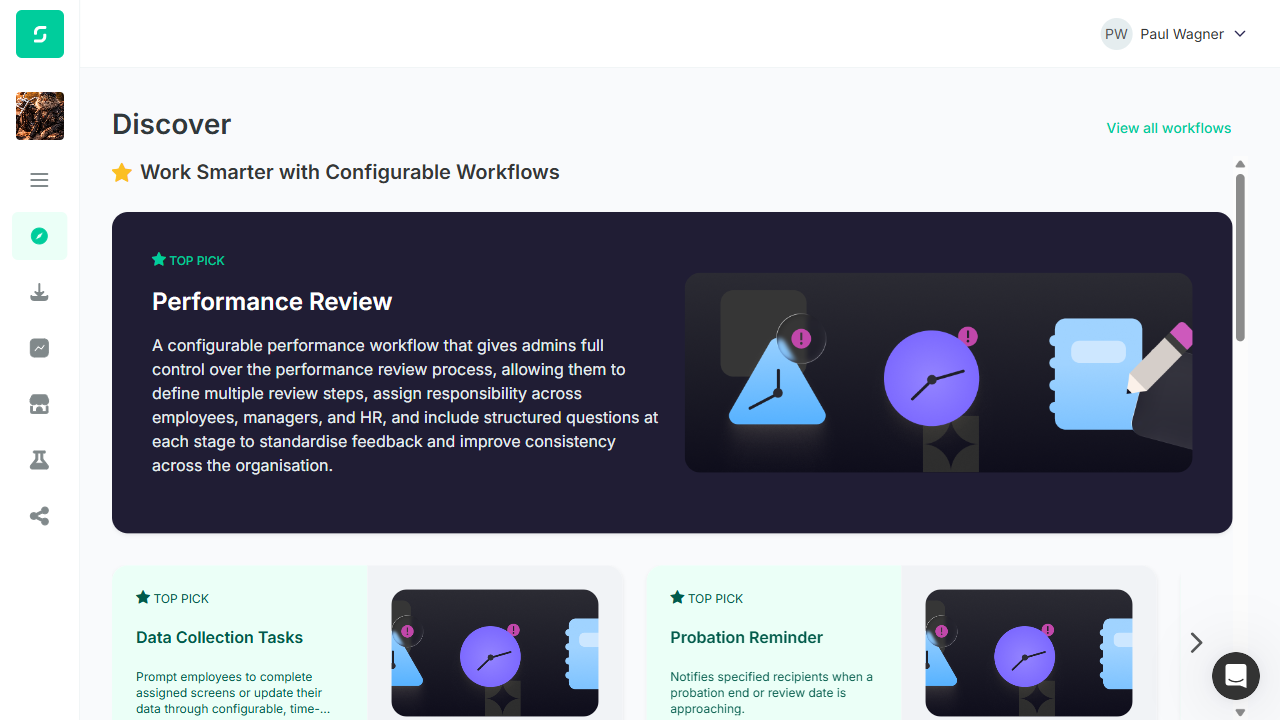
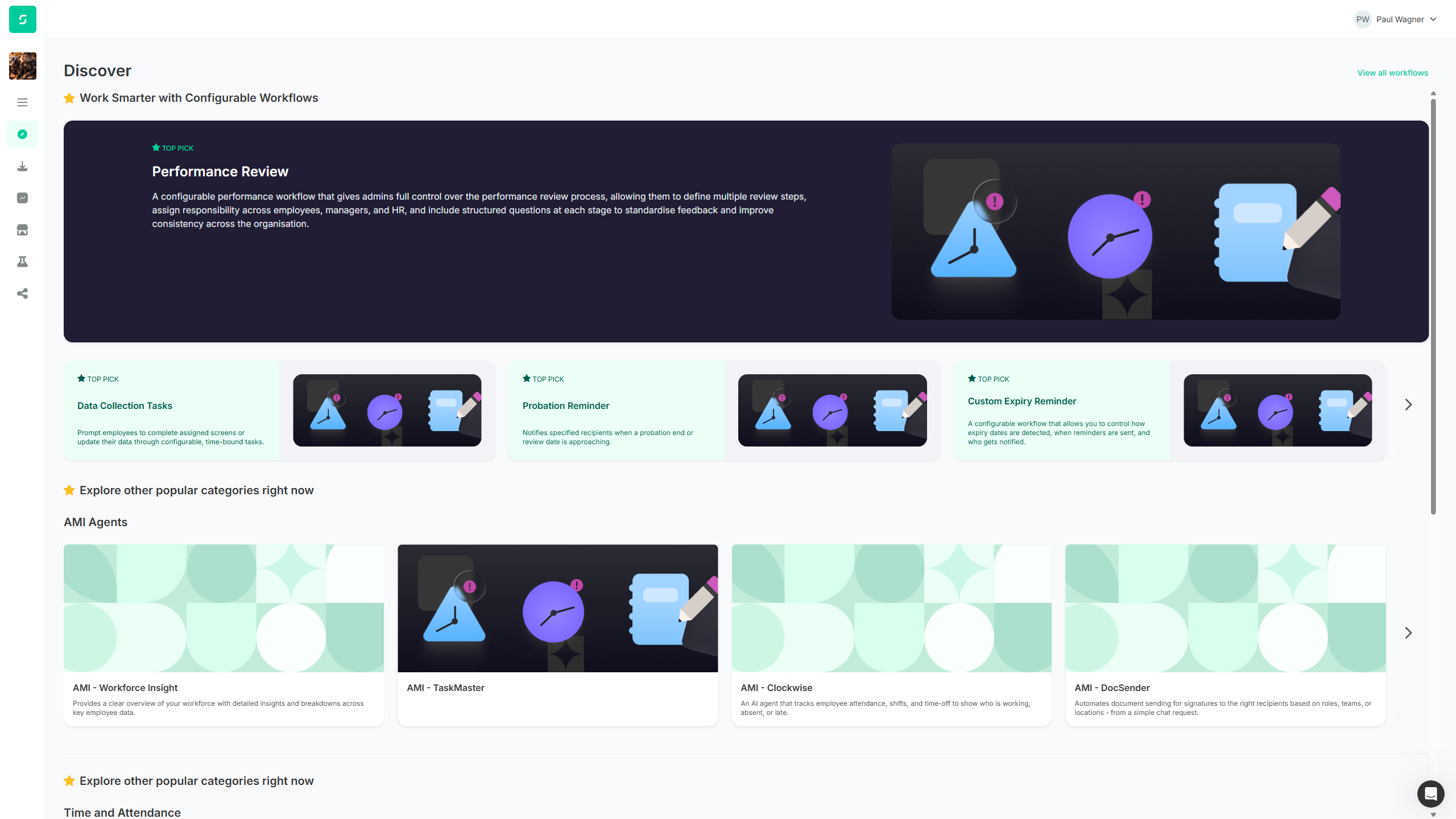
Initial run was at 1251px viewport — results below characterise behaviour across 7 viewports (1280, 1440, 1680, 1920, 2560, 3840, 5120). Measurements taken via getBoundingClientRect() in the live browser. Sidebar nav consumes a constant ~80px regardless of viewport, so the content area = viewport − 80.
Tile-count behaviour
| Viewport | Spotlight tiles visible | Category tiles visible (per row) | Story requirement | Verdict |
|---|---|---|---|---|
| 1280 × 720 (small laptop) | 2 | 4 | 3 / 3 | Spotlight: FAIL • Category: FAIL |
| 1440 × 900 (MacBook Air) | 2 | 4 | 3 / 3 | Spotlight: FAIL • Category: FAIL |
| 1680 × 900 | 3 | 4 | 3 / 3 | Spotlight: PASS • Category: FAIL |
| 1920 × 1080 (Full HD) | 3 | 4 | 3 / 3 | Spotlight: PASS • Category: FAIL |
| 2560 × 1440 (QHD / 2K) | 3 | 4 | 3 / 3 | Spotlight: PASS • Category: FAIL |
| 3840 × 2160 (4K UHD) | 3 | 4 | 3 / 3 | Spotlight: PASS • Category: FAIL |
| 5120 × 1440 (Ultra-wide) | 3 | 4 | 3 / 3 | Spotlight: PASS • Category: FAIL |
Breakpoint observed: the Spotlight carousel jumps from 2 to 3 visible tiles somewhere between 1440 and 1680px. The category carousel shows 4 tiles regardless of viewport width.
Primary tile content scaling (F5 evidence)
| Viewport | Black banner width | Text column width | Image width | Stretching |
|---|---|---|---|---|
| 1920px | 1761px (92% of viewport) | 840px | 790px | Acceptable |
| 3840px | ~3528px (92%) | 1800px (grew 2.1×) | 790px (unchanged) | Severe |
| 5120px | 4960px (97%) | 2440px (grew 2.9×) | 790px (unchanged) | Extreme |
🚨 F5 (NEW) — Story requirement explicitly violated at large viewports
Story line: "Primary workflow will have black banner around it that spans to the width of the screen, using the black space as margins to keep image and text from being stretched when zooming"
What's happening: The black banner DOES span the screen width (good), but the content inside has no max-width constraint — the text column grows linearly with viewport (from 840px at 1920 → 2440px at 5120). Meanwhile the image stays at a fixed 790px regardless of viewport, so it visually shrinks relative to the page. The story's intent (use black space as side margins to prevent stretching) is not implemented.
Suggested fix: Apply a max-width (e.g. ~1200px) to the content container inside the black banner, centred horizontally. The banner itself can continue spanning the full viewport; only the inner content should be capped, leaving the surrounding black space as the natural margin.
Why initial run missed this: Single-viewport runs (1251px in the first session) test only one breakpoint. The stretching only becomes visible at viewports >~2000px. Adding multi-viewport sweeps to standard regression should catch responsive-scaling defects earlier.
Viewport screenshots (full responsive sweep)
Additional Observations (Not in TC Scope)
OBS-1 — Duplicated "Explore other popular categories right now" Heading
Story line: "Description with star at the beginning to seperate spotlight to other categories ⭐ Explore other popular categories right now" — appears once in the Category section bullet, implying a single separator between Spotlight and the categories area.
Actual: The star-prefixed description heading appears 3 times in the DOM (refs e148, e212, e276) — once above EACH category section (AMI Agents, Time and Attendance, Mobile Apps).
OBS-2 — "View All Workflows" Casing
Story line: "View All Workflows link in top right as per design" (title case).
Actual: Button text reads "View all workflows" (sentence case). Functionally correct (navigates to /store-workflows); only the casing differs.
OBS-3 — "View All Workflows" Element Type
Story line: "View All Workflows link in top right" (link).
Actual: The element is rendered as a <button> rather than an <a> link.
OBS-4 — Navigation Icon Size Fix Confirmed (story requirement met)
Story line: "Navigation Icon needs to be updated as looks larger than in design" (green-added in revision — a developer task to do).
Actual: Measured all 6 sidebar icons at 24x24px — Discover icon is consistent with the rest of the sidebar. The fix is in place. Story requirement satisfied.
Design vs Story Conflicts (context only)
Where the design and story disagree, the dev had to choose. This section documents which they followed — it is informational only and does not affect the PASS/FAIL verdicts above. The story is the source of truth, so anywhere the implementation matches the design but contradicts the story, a failure is logged.
| Item | Figma design (ENG-5332_rev.png) | Revised story (ENG-5332_rev.xml) | Implementation | Followed |
|---|---|---|---|---|
| Primary tile label | "WORKFLOW OF THE WEEK" | "All spotlight tiles will have TOP PICK label" | TOP PICK | Story |
| Category filter chips row (All / New legislation / etc.) | Visible chips row above categories | Struck through, explicitly noted: "REMOVE FROM DESIGN" | No chips | Story |
| Spotlight tiles visible at a time | 2 labeled workflows visible (at design canvas width ~1440) | "three tiles at a time" | Viewport-dependent: 2 at ≤1440, 3 at ≥1680 | Mixed (see F2) |
| Category tiles visible at a time | ~4 distinct labeled workflows visible | "Three workflow tiles visible by default" | 4 labeled workflows visible at every viewport (1280-5120) | Design (fails story — see F3) |
| Primary tile content width on large screens | Not visible in static design (fixed canvas) | "use black space as margins to keep image and text from being stretched" | No max-width — content fills banner up to 4960px wide; image stays fixed 790px | Neither (fails story — F5) |
| "View all workflows" casing | "View All Workflows" (title case) | "View All Workflows" (title case) | "View all workflows" (sentence case) | Neither — OBS-2 |
ⓘ Why the tile-count failures may not be the dev's fault
Both F2 and F3 are tile-count mismatches between the story ("3") and what the design actually shows ("2" in Spotlight, "4" in Categories). The implementation matches the design exactly. The story revision changed "two → three" for the Spotlight carousel, but the Figma design was never updated to match — or the story text is stale and should be "two" / "four" respectively. Recommend reconciling the story text with the design before treating these as dev failures. Either:
- Update the design to show 3 tiles per row and ask dev to refit, OR
- Update the story to match the design counts (Spotlight: 2, Categories: 4) and close these as PASS
TC1 — Verify Discover Page Spotlight Section
Validates the Spotlight section layout including star-icon description, removed Title/Separator, primary tile with black banner and category chips, green-background carousel showing three tiles, TOP PICK labels, and scroll behaviour.
| Step | Action | Result | Evidence |
|---|---|---|---|
| 1 | Log in to the User App | PASS | Authentication completed; lands on /discover |
| 2 | Observe top of Discover page | PASS | heading "Discover" [level=1] followed by heading " Work Smarter with Configurable Workflows" [level=2] |
| 3 | No separate Title element above description | PASS | Description rendered directly as h2; no separate Title element exists between page heading and description |
| 4 | No Separator element above description | PASS | No separator element appears above the Spotlight description |
| 5 | Star icon at beginning of description | PASS | Empty generic precedes text in h2; visual confirmation of star icon |
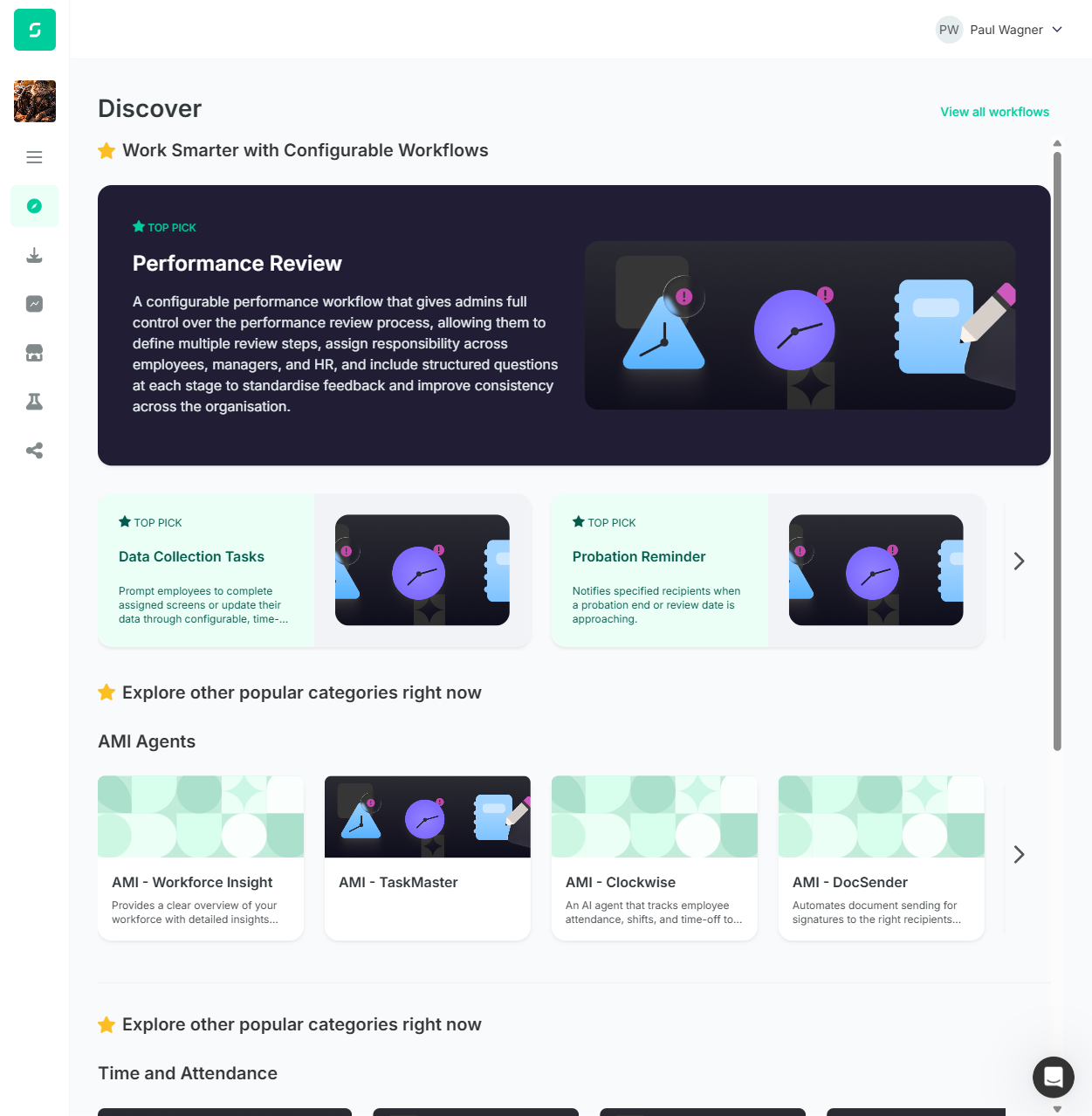
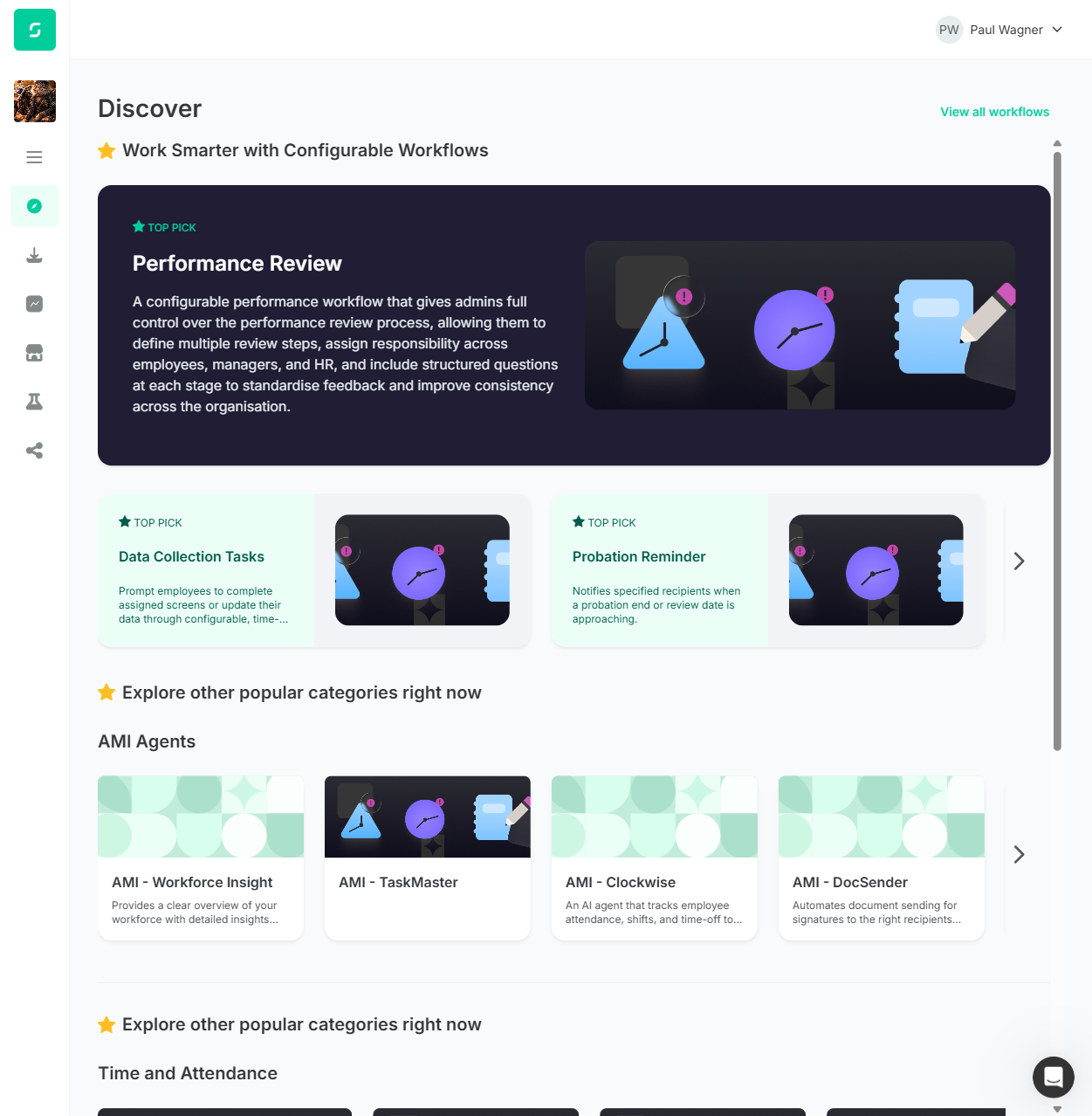
| 6 | Primary tile prominent with custom description | PASS | Performance Review with h3 heading and long custom paragraph different from standard tile copy |
| 7 | Black banner around primary tile | FAIL | F5: Banner spans full width as required, but content inside stretches with viewport (text col 840px@1920 → 2440px@5120). Story said "using the black space as margins to keep image and text from being stretched" — not satisfied at viewports >~1100px. |
| 8 | Zoom test — banner margins prevent stretching | FAIL | F5: At 1.5x zoom at small viewport content stays in margins (looks ok). But at native large viewports (3840, 5120) the content stretches with the screen and the image stays at fixed 790px so the requirement is broken in the wide direction. |
| 9 | Category chips on primary workflow tile | FAIL | F1: No chip elements present on Performance Review tile — DOM has only TOP PICK badge, h3 heading, description, image |
| 10 | Carousel has green background | PASS | Light green background visible below Performance Review tile containing the carousel |
| 11 | Three tiles visible at a time | FAIL | F2 (viewport-dependent): 2 tiles visible at 1280/1440 (story FAIL); 3 tiles visible at 1680+ (story PASS). Logged as FAIL because common laptop sizes show 2. |
| 12 | TOP PICK label on every Spotlight tile | PASS | TOP PICK present on Performance Review + all 4 carousel tiles |
| 13 | Flick/scroll Spotlight carousel | PASS | After Next Page click, Previous Page button appeared and new tiles shifted into view |
TC1 Visual Evidence
TC2 — Verify Discover Page Category Sections
Validates category section layout including star-icon separator description, absence of category filter chips, three category sections with correct alignment, tile display, description truncation, and carousel scroll.
| Step | Action | Result | Evidence |
|---|---|---|---|
| 1 | Log in to the User App | PASS | Authentication completed; lands on /discover |
| 2 | No category filter chips above category sections | PASS | No filter chip row exists between Spotlight and AMI Agents |
| 3 | Description with star "Explore other popular categories right now" | PASS | Heading present with star icon — but duplicated 3 times (one above each category, see OBS-1) |
| 4 | Exactly three category sections | PASS | AMI Agents (e150), Time and Attendance (e214), Mobile Apps (e278) |
| 5 | Category name aligned with first tile, not separator | PASS | JS measurement: heading left=112px, first tile left=112px — aligned |
| 6 | Three workflow tiles visible by default | FAIL | F3: 4 tiles fully visible per category row at all 7 tested viewports (1280-5120). Story says 3, implementation says 4 universally — not a responsive issue. |
| 7 | Description text uses all available space before cut-off | PASS | Tile descriptions fill horizontal width and truncate when exceeding |
| 8 | Flick/scroll category carousel | PASS | After Next Page click on AMI Agents, tiles shifted, Previous Page appeared |
| 9 | Categories in Admin-configured order | PASS | DOM order matches story config: AMI Agents → Time and Attendance → Mobile Apps |
TC2 Visual Evidence
TC3 — Verify Tile Behaviour and Page Navigation
Validates that Discover tiles do not show category tags or install buttons, tile click opens the standard Hub detail view, View All Workflows navigates to the Workflow Hub, and the sidebar navigation icon matches the design.
| Step | Action | Result | Evidence |
|---|---|---|---|
| 1 | Log in to the User App | PASS | Authentication completed; lands on /discover |
| 2 | No category tags on category-section tiles | PASS | Tile structure contains only image, title, description — no chip/tag elements |
| 3 | No install button on Discover tiles | PASS | No button "Install" element exists within any tile group on Discover |
| 4 | Click category tile opens detail view | PASS | Click on AMI - TaskMaster navigated to /store-workflows/<id> with breadcrumb "Home > Workflow hub > AMI - TaskMaster" |
| 5 | Navigate back to Discover | PASS | URL /discover, heading "Discover" h1 displayed |
| 6 | Click Spotlight tile opens detail view | PASS | Click on Data Collection Tasks navigated to /store-workflows/<id> with full Hub detail page |
| 7 | Navigate back to Discover | PASS | URL /discover, heading "Discover" h1 displayed |
| 8 | View All Workflows link in teal text top-right | PASS | Element text "View all workflows" (lowercase, see OBS-2); colour rgb(0,205,156) teal; position left=1077px / top=118px in 1251px viewport |
| 9 | Click View All Workflows → Workflow Hub | PASS | URL changed to /store-workflows, heading "Workflow Hub" h1 with subtitle |
| 10 | Sidebar icon size matches design | PASS | All 6 sidebar icons measured at 24x24px — Discover icon consistent with rest |
TC4 — Verify This Month's Configured Content
Validates the specific content configured for this month's Discover page: spotlight description, Performance Review as the primary spotlight workflow with custom description, spotlight workflow order, and the three configured categories with their assigned workflows.
| Step | Action | Result | Evidence |
|---|---|---|---|
| 1 | Log in to the User App | PASS | Authentication completed; lands on /discover |
| 2 | Spotlight description "Work Smarter with Configurable Workflows" with star | PASS | h2 contains star icon then text matching story exactly |
| 3 | Primary tile is Performance Review | PASS | heading "Performance Review" [level=3] and img "Performance Review" |
| 4 | Primary tile description matches story text | FAIL | Actual text is a longer reworded version; story author noted in ticket comment that text might change |
| 5 | Spotlight carousel tiles in order | PASS | Data Collection Tasks → Probation Reminder → Custom Expiry Reminder → Work Anniversary Reminder |
| 6 | First category heading "AMI Agents" | PASS | heading "AMI Agents" [level=2] first category |
| 7 | AMI Agents tiles all present | PASS | AMI - Workforce Insight, AMI - TaskMaster, AMI - Clockwise, AMI - DocSender, AMI - ATS Reports |
| 8 | Second category heading "Time and Attendance" | PASS | heading "Time and Attendance" [level=2] |
| 9 | Time and Attendance tiles all present | PASS | Late & Missed Clocks Notification, Overtime Adjustments, Performance Time, Timesheet Accrual Hours - With Request Approval, Verify Attendance |
| 10 | Third category heading "Mobile Apps" | PASS | heading "Mobile Apps" [level=2] |
| 11 | Mobile Apps tiles all present | PASS | App - People Profile, App - Roll Call, App - Clock in, App - Notify sickness, App - Attendance |
TC4 Visual Evidence
Screenshot Gallery
Click any image to expand. 15 screenshots: design reference, initial-viewport findings, and the 6-viewport responsive sweep.
Design reference & initial findings
Responsive sweep (1280 → 5120 viewports)
Conclusion (vs revised story)
Graded strictly against ENG-5332_rev.xml (story = source of truth): 38 of 43 steps pass (88%).
Update vs original report: Multi-viewport retest (1280 / 1440 / 1680 / 1920 / 2560 / 3840 / 5120) surfaced F5 (HIGH) — black-banner content stretches with viewport at any width >~1100px, breaking the story's explicit "use black space as margins" requirement. Also refined F2 to viewport-dependent (passes at ≥1680, fails at common laptop sizes 1280/1440). F3 confirmed across all viewports (4 category tiles everywhere).
Story requirements met by the implementation:
- Spotlight Title and Separator removed ✓
- Star-icon description "Work Smarter with Configurable Workflows" present ✓
- Performance Review as primary tile with custom Spotlight description (not Hub description) ✓
- Black banner around primary tile, spans full screen width ✓ (but content stretches on wide screens — F5)
- Carousel below primary tile with green background ✓
- TOP PICK label on every Spotlight tile (including primary) ✓
- Carousel scrolls to next workflows on click ✓
- No category filter chips above category sections (story said "REMOVE FROM DESIGN") ✓
- Star-prefixed "Explore other popular categories right now" description present ✓
- Exactly 3 category sections in admin-configured order (AMI Agents, Time and Attendance, Mobile Apps) ✓
- Category name aligned with first tile (measured at left=112px for both) ✓
- Category descriptions use all available space before truncating ✓
- Category carousel scrolls ✓
- Discover tiles do NOT show category tags or install buttons ✓
- Tile click opens the standard Hub detail view (
/store-workflows/:id) ✓ - "View All Workflows" navigates to Workflow Hub ✓
- Sidebar navigation icon resized to match other sidebar icons (24x24px) ✓
- All this month's configured workflows present with exact names across Spotlight and 3 categories ✓
Story requirements NOT met (the 5 FAILs after responsive sweep):
- TC1 PARTIAL (9/13): Missing category chips on primary tile (F1, HIGH); content stretches inside black banner at viewports >~1100px (F5, HIGH); only 2 Spotlight tiles visible at common laptop sizes (F2, MEDIUM)
- TC2 PARTIAL (8/9): 4 category tiles visible at every tested viewport, story says 3 (F3, MEDIUM)
- TC3 PASS (10/10): Fully meets story requirements
- TC4 PARTIAL (10/11): Spotlight description text doesn't match story verbatim (F4 — story author noted text may change)
Recommended Next Steps
- F5 (High — new) — Add
max-widthto primary tile content. Story line: "using the black space as margins to keep image and text from being stretched when zooming". Currently the banner spans full width and the content fills the banner, so on 2K/4K screens text stretches to 2440px and the fixed-790px image looks lost. Cap inner content at ~1200px centered; let the black space act as natural side margin. - F1 (High) — Add category chips to primary Spotlight tile. Story line: "Primary workflow will also display it’s categories as chips". Clear dev gap unaffected by any design-vs-story conflict.
- F2 (Medium) — Spotlight carousel only shows 3 tiles above 1680px. At common laptop sizes (1280, 1366, 1440) it shows 2. Either the breakpoint needs lowering, or the story should specify a minimum viewport. Note: passes at 1920+ which is most desktop monitors.
- F3 (Medium) — Categories show 4 tiles at every viewport. Reconcile with product/design: story says "three" universally, design shows 4, implementation shows 4. Suggest Cristian/Abbi confirm whether story text or design intent is correct.
- OBS-1 (Medium) — Remove duplicated star headings. The "Explore other popular categories right now" line appears above each of the 3 category sections in DOM. Story intends a single separator between Spotlight and Categories — keep one, drop two.
- F4 (Low) — Confirm Performance Review description with content owner. Cristian commented "i might change it a bit if it needs more or less text" — deployed text may be intentional. Confirm and close.
- OBS-2 + OBS-3 (Low) — "View all workflows" casing & element type. Story says title-case and "link". Currently lowercase and a
<button>.
💡 Process lesson
The original report graded the implementation at a single viewport (1251px, the playwright-cli default). The tester rightly pushed back that 4K / 2K monitors are common in real use, prompting a multi-viewport retest that surfaced F5 (HIGH-severity scaling bug) and refined F2 from "fail" to "viewport-dependent fail". Going forward, responsive sweeps across at least small (1280), standard (1920) and large (2560+) viewports should be part of the default TC execution flow — this isn't in the current run-tcs skill but worth adding.